How I Rebuilt CSV Imports to Handle 10,000 Messy Rows Without Breaking
Imports break on real data. Here's how I rebuilt Relaticle's import wizard with staged SQLite storage, smart matching, async validation, and row-level failure handling.
Imports look simple until they aren't. The moment real users bring messy CSVs — ambiguous dates, duplicate rows, partial updates — into a live CRM, a basic importer starts failing in subtle ways.
For Relaticle V3, I rebuilt imports as a dedicated module with a strict workflow, staged processing, and explicit failure handling. This post breaks down the architecture and the tradeoffs behind it.
30-second walkthrough: upload a CSV, map columns, review corrections, and import — without touching production data.
Why I Rebuilt Imports for V3
The old pattern most teams start with is straightforward:
- Parse CSV
- Validate in memory
- Insert/update directly
That works for small clean files. It falls apart the moment someone uploads a CSV where "Acme Corp" appears three different ways, dates mix MM/DD and DD/MM, and half the rows should update existing records instead of creating duplicates.
What you actually need:
- Matching against existing records without false positives
- Safe handling of relationships (company, contact, assignee links)
- Value-level corrections before anything hits the database
- Resumable state and reliable progress tracking
- Clear failure reporting users can act on
For V3, I wanted imports to behave like a proper workflow, not a one-shot script.
Product Flow: 4 Steps, One State Machine
The new Import Wizard is built around four explicit steps:
- Upload CSV
- Map Columns
- Review Values
- Preview and Import
Each step maps to an import status (uploading, mapping, reviewing, previewing, then importing/completed/failed) so the UI and backend stay in sync.
This looks like a UI detail, but it is a reliability decision. You can restore context, prevent invalid transitions, and reason about failures cleanly.
The Key Decision: Stage Data Outside Primary Tables
The most important V3 decision was introducing a per-import staging store.
Instead of writing directly to CRM tables during upload/review, each import gets its own SQLite-backed store at storage/app/imports/<import-id>/data.sqlite. One file, one import, one schema:
$schema->create('import_rows', function (Blueprint $table): void {
    $table->integer('row_number')->primary();
    $table->text('raw_data');
    $table->text('validation')->nullable();
    $table->text('corrections')->nullable();
    $table->text('skipped')->nullable();
    $table->string('match_action')->nullable();
    $table->string('matched_id')->nullable();
    $table->text('relationships')->nullable();
    $table->boolean('processed')->default(false);
});

$schema->table('import_rows', function (Blueprint $table): void {
    $table->index('validation');
    $table->index('match_action');
    $table->index('skipped');
});
row_number is the primary key, not an autoincrement id. The row's position in the user's file is its identity — that's what lets an error report say "row 4,182" and have it mean something to the person who uploaded it.
The three indexes exist because the Review step filters on exactly those columns: show me rows with validation errors, show me rows that will be skipped, show me rows that will update rather than create. Without them, every filter click is a full scan of the staging table.
There's one more guard in the store, and it's in the database rather than PHP:
CREATE TRIGGER validate_raw_data_insert
BEFORE INSERT ON import_rows
BEGIN
    SELECT CASE
        WHEN NEW.raw_data IS NULL OR NEW.raw_data = '' OR NEW.raw_data = '{}'
        THEN RAISE(ABORT, 'raw_data cannot be null or empty')
    END;
END
An empty staged row is a bug that surfaces three steps later as a confusing validation error. Putting the invariant in the schema means a bad writer fails at the moment it writes, not at the moment someone reads.
This separation buys you three things:
- Users review and correct data before anything touches production.
- Matching and validation run repeatedly without data drift.
- Cleanup is trivial: delete the import store directory.
The third one has a sharp edge worth naming. A per-import file on disk needs a cleanup job, and a cleanup job that sweeps orphaned directories needs a staleness guard — otherwise it will eventually delete the SQLite file of an import that is currently running. I shipped that bug and found it later, while chasing an unrelated test failure.
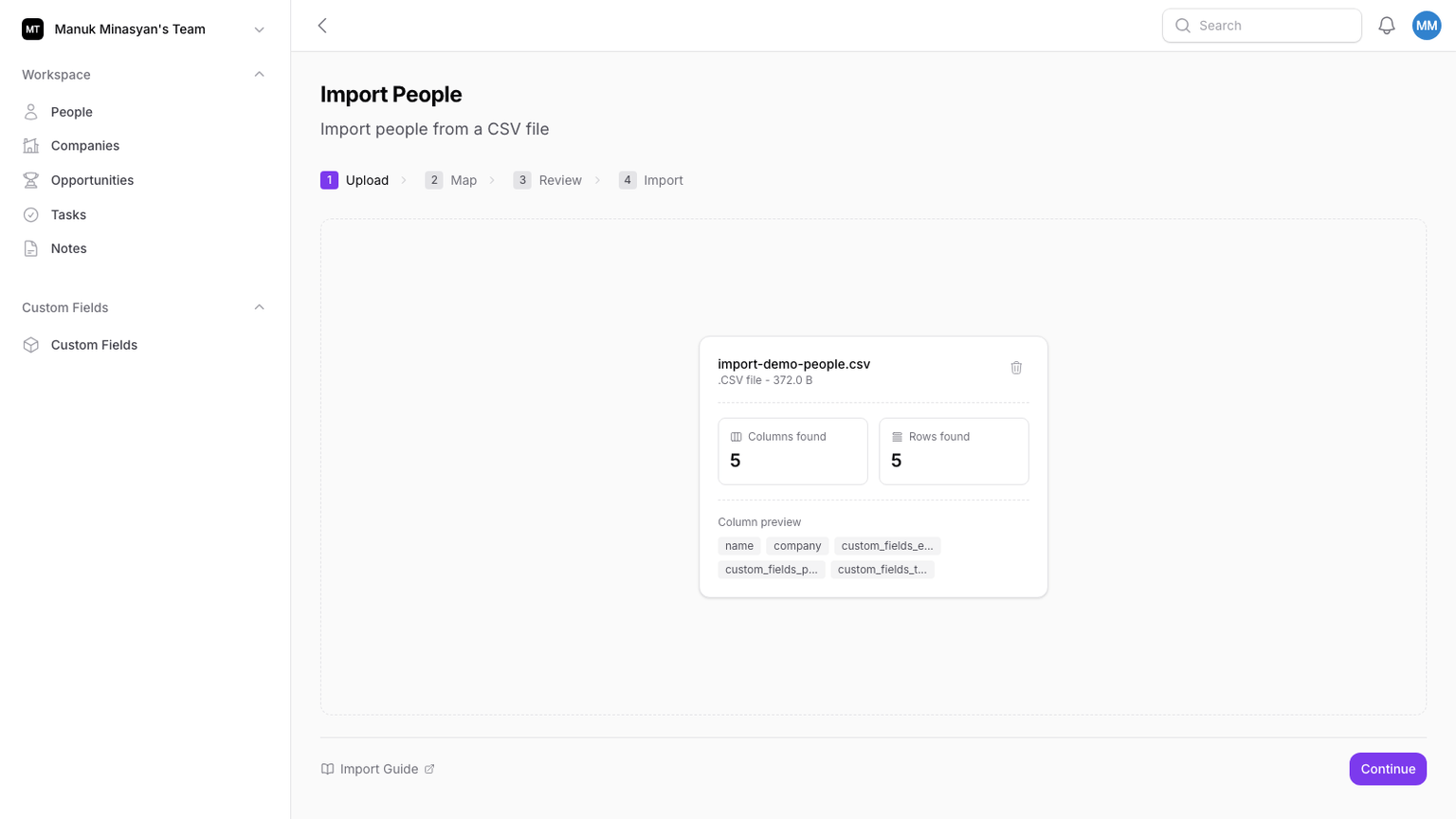
What Happens When Someone Uploads 10,000 Rows?
Upload enforces hard limits:
- Max file size: 10MB
- Max rows: 10,000
- Chunk insert size: 500 rows
- Header sanitization and duplicate-header detection
Rows are streamed from CSV and inserted into the staging store in chunks, not loaded into one huge in-memory structure:
private function chunkSize(): int
{
    return once(fn (): int => (int) config('import-wizard.chunk_size', 500));
}
500 is deliberately conservative. SQLite has a variable limit per statement, and each staged row carries a JSON blob of every column in the user's file — a 60-column CSV at a 5,000-row chunk will blow past the limit on a file that looked fine in testing. The chunk size is config, not a constant, because the right number depends on how wide the files are.
Practical effect: uploads stay stable and fast even with large files, and failure modes are explicit (empty file, duplicate headers, too many rows, bad format).
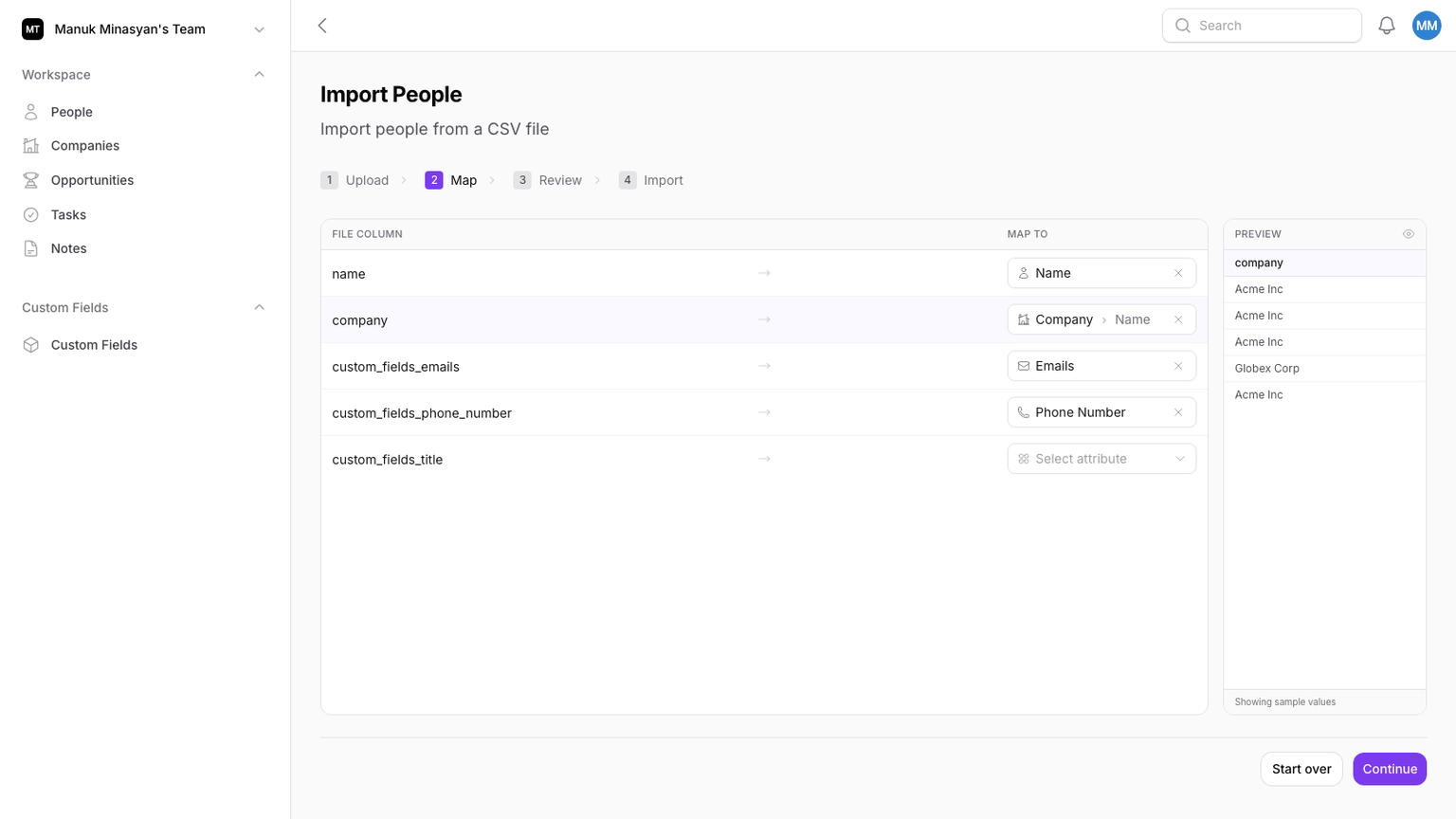
Smart Mapping: Automation With an Escape Hatch
Mapping combines three layers:
- Header-based guesses (aliases like
company_name,contact_email, etc.) - Entity-link mapping for relationships (company, contact, assignee, polymorphic links)
- Data-type inference for unmapped columns
The type inference is driven by the custom-field system, not a static hardcoded map. That keeps behavior aligned with actual field configuration per team/entity.
If users skip mapping any matchable field (like ID, email, or domain), the wizard warns them they may create duplicates. It does not silently continue as if everything is fine.
Review: Where Most Importers Stop, V3 Keeps Going
On entering the Review step:
- A validation job is dispatched per mapped column
- A separate match-resolution job is dispatched
This means users can start interacting with results while backend jobs complete, instead of waiting on one synchronous validation wall.
Per column rather than per row is the decision that makes this cheap. A 10,000-row CSV with a country column has maybe thirty distinct values in it. Validating thirty values and mapping the results back beats validating ten thousand:
$uniqueValues = $this->fetchUncorrectedUniqueValues($store, $jsonPath);

if ($uniqueValues === []) {
    return;
}

$errorMap = $validator->batchValidateFromColumn(
    $this->column,
    $import->getImporter(),
    $uniqueValues,
);
The Uncorrected in that method name is doing real work. When a user fixes a bad date format, the correction applies to every row carrying that raw value, and re-validation only looks at values nobody has corrected yet. Fixing one value in a file where it appears 800 times is one edit, not 800.
The jobs are batched, and each one checks $this->batch()?->cancelled() before doing anything — because a user who backs out of the Review step to remap a column shouldn't have twelve validation jobs still writing results for the old mapping.
Users can:
- Fix invalid values once and apply those corrections to all matching raw values
- Skip problematic values
- Adjust date/number formats when ambiguity exists
Everything is persisted in staged JSON fields, so each correction is deterministic and replayable.
Matching Model: Create, Update, or Skip
The resolver marks each row with one of three actions:
enum RowMatchAction: string
{
    case Create = 'create';
    case Update = 'update';
    case Skip = 'skip';
}
What decides between them is a separate enum — the behavior configured on the match field, not the outcome on the row:
enum MatchBehavior: string
{
    case MatchOnly = 'match_only';
    case MatchOrCreate = 'match_or_create';
    case Create = 'create';

    public function performsLookup(): bool
    {
        return $this !== self::Create;
    }

    public function createsOnNoMatch(): bool
    {
        return $this === self::MatchOrCreate || $this === self::Create;
    }
}
Two enums instead of one is the whole point. MatchBehavior is policy the user configures once per field; RowMatchAction is the decision the resolver reached for one specific row. Keeping them apart means you can answer "why is row 812 going to be skipped?" by naming the field and its behavior, instead of reverse-engineering a chain of conditionals.
The three behaviors map onto real intent:
- Match-only — update existing records, skip anything that doesn't match. For files that are pure updates.
- Match-or-create — find it or make it. The default for most fields.
- Create — never look up, always insert. This is what name-based matching gets, deliberately. "Acme" and "Acme Corp" and "ACME Inc." are not reliably the same company, and a matcher that guesses will silently merge two customers.
That last one is a policy decision disguised as a default. It's better to create a duplicate a user can merge than to merge two records they can't unmerge.
Execution: What Happens When Rows Fail?
The import runs as a queued job with retries and backoff, processing rows in chunks.
Key behaviors:
- Only unprocessed rows are handled
- Row-level processing marks success/failure without stopping the whole import
- Existing records are preloaded for update chunks
- Multi-choice field values merge on update
- Failed rows are captured with error messages and can be downloaded as CSV
One detail I like in this design: intra-import deduplication. Match resolution runs before the import executes, so every row is evaluated against the database as it looked at that moment. If the same company appears on rows 12 and 907, both get marked create — and you end up with two of it.
The fix is a cache of matchable values populated as rows are written, checked before each insert:
$effectiveAction = $row->match_action;
$effectiveMatchedId = $row->matched_id;

if ($effectiveAction === RowMatchAction::Create
    && $matchField instanceof MatchableField
    && $matchSourceColumn !== null
) {
    $cachedRecordId = $this->lookupMatchableValueCache($row, $matchField, $matchSourceColumn);

    if ($cachedRecordId !== null) {
        $effectiveAction = RowMatchAction::Update;
        $effectiveMatchedId = $cachedRecordId;
        $this->dedupedRows[] = $row->row_number;
    }
}
Note that it computes an $effectiveAction rather than mutating $row->match_action in place. The staged row keeps the decision the resolver made; the promotion is a runtime override. That distinction matters when the import fails halfway and you need to explain what happened.
The promoted rows are then written back in one statement rather than row by row:
if ($this->dedupedRows !== []) {
    $store->rows()
        ->whereIn('row_number', $this->dedupedRows)
        ->update(['match_action' => RowMatchAction::Update->value]);

    $this->dedupedRows = [];
}
So a user who uploads a file where the same company appears forty times gets one company and thirty-nine updates, and the import history reflects that honestly rather than reporting forty creations.
Operational Hardening in V3
Beyond the happy path, I added practical operations support:
- Transition lock to prevent double-starting the same import
- Import history view with created/updated/skipped/failed counts
- Signed failed-rows download
- Cleanup command for abandoned and terminal imports
The cleanup strategy is especially useful in production: completed/failed stores are removed after a short retention window, and stale abandoned imports are purged.
What This Says About Relaticle V3
The Import Wizard reflects broader V3 architecture principles:
- Workflow over one-shot scripts
- Staged processing over direct mutation
- Async jobs for expensive work
- Team-scoped safety as a default
- Extensibility via importer contracts and entity-link abstractions
Still a modular monolith, but with clearer boundaries and better operational behavior. That modularity-first approach is something I've written about more broadly in Building Scalable Systems: Practical Lessons.
If You're Building an Importer, My Practical Checklist
- Separate staging from final writes
- Make matching policy explicit (and user-visible)
- Support value-level corrections before commit
- Model row action as
create/update/skip - Keep a downloadable failed-row report
- Add cleanup from day one
- Test every stage (UI + jobs + validators + matchers)
Imports are one of those product surfaces where reliability compounds trust. If users get burned once by "mystery imports," they stop trusting the system.
For Relaticle V3, the goal was simple: make imports boring in production, even when the data isn't.
Building imports for your own product? I've made most of the mistakes already — happy to save you some. DM me on X or LinkedIn.